The Ultimate Guide to Evergreen Funnels for Coaches (The Freedom Funnel)
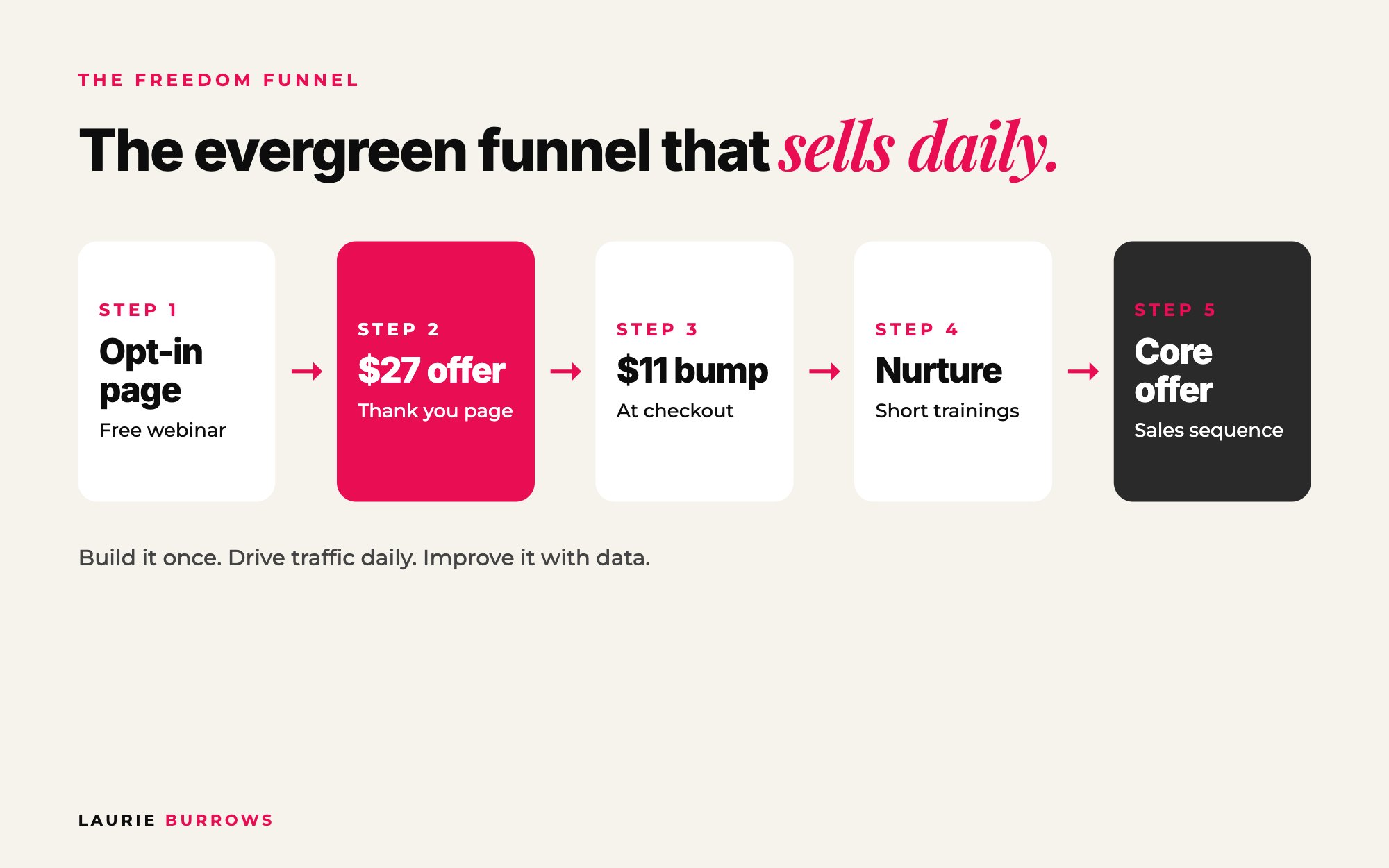
Short answer: an evergreen funnel is a sales system that sells your offer every day without you running a live launch. Mine is called the Freedom Funnel: a pre-recorded webinar behind an opt-in page, a $27 offer on the thank you page, an $11 to $17 order bump at checkout, then a nurture sequence and a sales sequence that move people into your core offer. Build the core pages once, drive traffic to it every day, and use the numbers to improve one thing at a time.
If you're tired of the launch rollercoaster, where you spend six weeks promoting, have a great week of sales, then go back to zero and start all over again, this guide is for you.
I started my business in January 2020, pregnant and then with a newborn, so I never had the luxury of endless hours. I needed a way to sell that didn't rely on me being on calls, live in the DMs or launching every month. That's what the Freedom Funnel became: a system that brings in leads and sales every single day, whether I'm working or not. I've tested so many versions of it that every page, every price point and every email in it now has a reason for being there. Here it is, page by page.
Who this guide is for (and what you'll have by the end)
This is for coaches, consultants and online service providers with a core offer that already sells (or that you're ready to sell) who want daily sales instead of launch spikes. By the end you'll have:
- Your funnel map: every page and email you need, and the minimum to go live.
- Copy templates for the opt-in page, thank you page, order bump and post purchase page.
- Six nurture emails and six sales emails you can adapt today.
- A traffic plan with daily, weekly and paid actions.
- The benchmarks to aim for at every stage and a troubleshooting table for when a number is off.
- A 30 day build plan to get it live.
What is an evergreen funnel?
An evergreen funnel is a sales system that's always open. Instead of opening and closing the doors on your offer a few times a year, people can find you, opt in, buy a low priced offer, get nurtured by email and buy your core offer on any day of the year.
A funnel isn't a single landing page. It's the full customer journey from someone finding you for the first time to becoming a client. Every page and every email asks the same question: what happens next? They opt in, what happens next? They buy, what happens next? They don't buy, what happens next? Build it that way and you stop leaving money on the table, because there's always a next step for every type of buyer.
Live launches still work, and live attendees buy far more than people watching replays. But a launch-only business has revenue in spikes. An evergreen funnel smooths that out, and launches become the extra on top. Evergreen vs live launch helps you decide which to start with.
The Freedom Funnel at a glance
| Page or sequence | Job | Price | Must have to go live? |
|---|---|---|---|
| Opt-in page | Turns visitors into leads for your free training | Free | Yes |
| Free training (pre-recorded webinar) | Builds trust and sells | Free | Yes |
| Thank you page | Delivers the training and sells your first low priced offer | $27 | Yes |
| Checkout page with order bump | Increases the order value | $11 to $17 | Yes |
| Upsell page | Another yes or no offer after checkout | $47 to $97 | No, add later |
| Post purchase page | Tells buyers exactly what to do next | Yes | |
| Training pages (3 to 5) | Host your nurture videos or secret podcast | Free | Yes |
| Nurture sequence (about 6 emails) | Builds trust, sells the $27 offer in the PS | Yes | |
| Sales sequence (about 6 emails) | Sells the core offer | Yes | |
| Core offer sales page | Where the core offer is bought | Your price | Yes |
| Monthly virtual event | Catches people who still haven't bought | Free | No, add later |
Do not panic about the size of that list. The bare minimum is a free training, the $27 offer, the order bump, the emails and your core offer page. If I gave you every possible add-on on day one, you'd get overwhelmed and build nothing. Get the core live, then add layers.
Step 1: Get your core offer funnel-ready
This is where most people go wrong. They build a beautiful funnel and then try to work out what it sells. We do it the other way round. The funnel is reverse engineered from your core offer: the offer you become known for. Before you build a single page, it needs the EVP Model:
- End result: your client's return on investment, worth more to them than the price. "Have a sales system that generates sales every single day" is an end result. "Eight modules on marketing" isn't.
- Value stacked: when the value clearly outweighs what they pay, it becomes a no brainer. More in how to build a value stack.
- Point of difference: why yours, when others do what you do. Often it's your framework, or how you've solved the problems clients have with finishing things.
Make it joinable any day. If your offer is entirely live with a fixed start date, it doesn't fit an evergreen funnel. Someone finds you in February, ready to buy, and the next round is July? That sale has gone. Structure it with a start here section, pre-recorded training and weekly live Q&A calls that work whether someone is on module one or module ten.
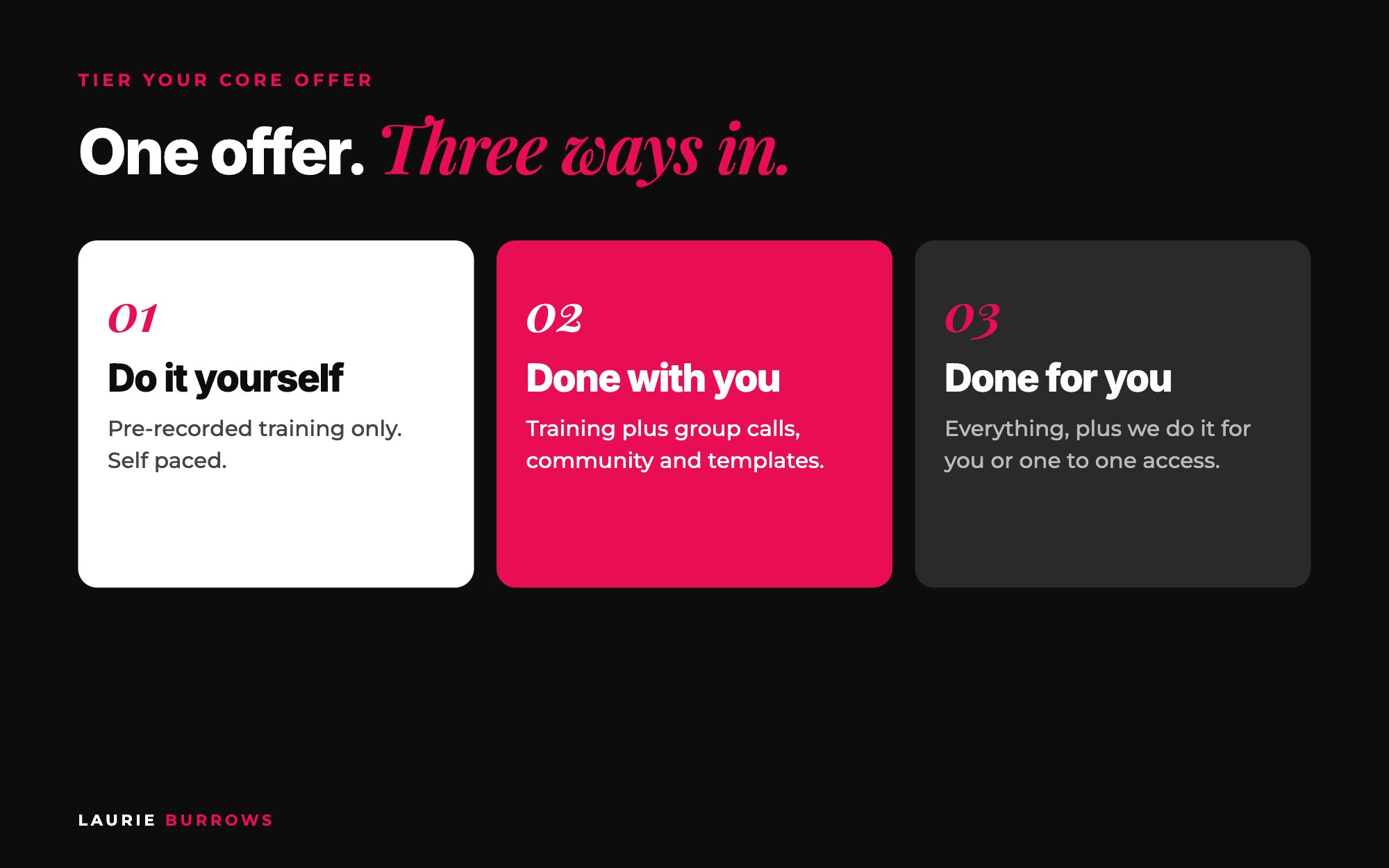
Tier it instead of creating more offers. You can grow with one core offer, tiered: do it yourself (training only), done with you (training plus calls, community and support) and done for you (everything plus you or your team doing a big chunk of it). Two tiers works too: the programme plus a VIP upgrade. Tiers give you an upsell and a down sell ready inside your funnel.
Copy and paste: core offer statement
[Offer name] helps [who] [end result] in [timeframe] without [what they don't want to do], using [your framework or point of difference].
Join any day. You get [training], [live support] and [community or tools].
Example: The Daily Sales System helps coaches make sales every day in 90 days without launching or living in the DMs, using a simple evergreen funnel.
Time: One to two hours. Done when: your offer has a one sentence end result, a value stack and a way to join on any day.
Step 2: Create your free training
The top of the funnel is a free resource that generates leads. You could use a checklist, guide or ebook, but I highly recommend a pre-recorded webinar or masterclass. You can give far more value than a PDF can, people get to see you, hear you and feel your energy, you can share your story so you build authority fast, and you can structure it so someone goes from barely knowing you to wanting to buy by the end.
Your free training has to relate to the end result of your core offer. If your core offer helps people get to consistent $10k months, your webinar speaks to that same end result. And name it after the end result, not the problem. Buyer A knows why they're stuck. Buyer B has no idea. Lead with the problem and Buyer B scrolls past. Lead with the end result and both opt in.
The webinar itself follows my 10 step structure, which I've written up in full in the ultimate guide to webinars that sell. Record it once, then upload the recording to Otter to transcribe it. That transcript makes every other page in this guide much faster to write, because the copy will sound like you.
Time: A day to plan and record. Done when: you have a 45 to 60 minute recording that teaches the what and the why, and pitches your core offer at the end.
Step 3: Build the opt-in page, section by section
Your opt-in page is very likely someone's first impression of your brand. Always put your training behind one. Never just hand out the link. Opting in tells you who your leads are and grows your email list, the one marketing asset nobody can take away from you. Social media accounts get hacked or shut down. I lost a whole LinkedIn account that way. Your list is yours.
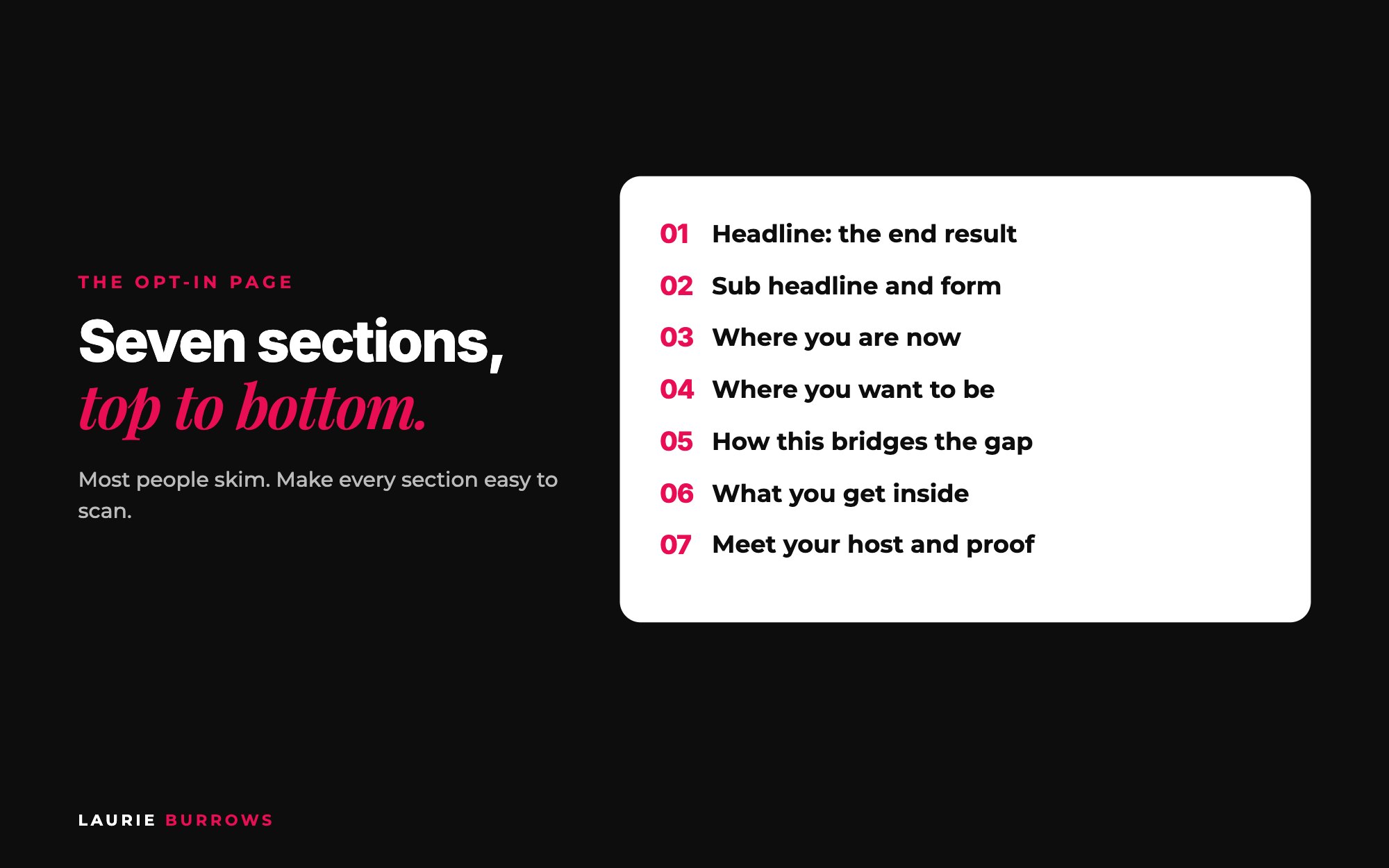
| Section | What goes in it | Example |
|---|---|---|
| 1. Hero: headline | The end result, clear, bold and benefit led, plus what they want to avoid | "Double your client inquiries in 7 days without paid ads or hustle" |
| 1. Hero: sub headline and form | What the freebie is and the quick payoff, then the opt-in form straight away | "Watch this free training to turn your followers into paying clients, starting today" |
| 2. Where you are | Their pain and frustration, in their words | "You're posting content that gets crickets, your DMs are dry..." |
| 3. Where you want to be | The vision: emotional, vivid, specific | "You want to wake up to fresh leads and sales notifications..." |
| 4. The bridge | Why this training is the missing link | "This training shows you the one piece that connects the two" |
| 5. What you get | Three to five tangible, benefit led bullets | "The exact post formula that starts DM conversations" |
| 6. Meet your host | Why you, in a few lines of positioning | Your experience and your best result |
| 7. Testimonials | Proof, if you have it | Screenshots or short quotes |
Most people won't read every word. They skim. So help them: give each section a different background, use different sizes, weights and colours of text on the lines you most want read, and stick to simple, easy to read fonts (avoid handwritten ones). Many people will opt in from the hero section, so put the form right there.
Copy and paste: opt-in page copy
Headline: [End result] in [timeframe] without [what they hate]
Sub headline: Watch this free [training / masterclass] and discover how to [quick payoff], starting today. [Get instant access]
Where you are: Right now you're [pain one]. You've tried [what they've tried]. And no matter how hard you work, [frustration].
Where you want to be: You want [vivid picture of the result]. You want to [lifestyle desire].
The bridge: This free training shows you [the missing piece], so you can go from [where they are] to [where they want to be].
Inside you'll discover: [Benefit one]. [Benefit two]. [Benefit three].
Meet your host: I'm [name]. [One line of experience]. [One line of results]. [Who you help now].
[Get instant access]
Full walkthrough in how to write an opt-in page that converts.
If building pages is the bit that's kept your funnel on the to-do list, you don't have to do it yourself. Ascendia OS has a Funnel Builder built in: it builds your opt-in page, thank you page and checkout inside your account from ready-made templates, on your own domain, ready to go live. You check it, tweak the words and publish.
Time: Two to three hours including build. Done when: you can opt in on your phone in under 30 seconds and land on the thank you page.
Step 4: The thank you page offer ($27)
Most people waste their thank you page with a "thanks, check your email" message. It's one of the most visited pages in your whole business, because everybody who opts in lands on it. So we use it to start converting people within minutes of finding you.
Why $27? Because we've tested lots of price points and it's the one that works best for us. The person landing on this page is cold. How you buy a $27 offer is very different to how you buy a $27,000 offer. At $27 it's an impulse decision. But here's the honest bit: at this point they don't really care about you yet. They buy because of what's inside. So it has to solve a specific micro problem and be the next logical step from the free training.
Make it the next logical step. Two examples from my own funnels: a free course launch checklist led to a $27 launch kit with training and templates; a free "50 ways to get clients" guide led to a mini course on quick ways to get clients in the next 48 hours. Same journey, one step further.
Thank you page structure
- A progress bar at 50%, so they know they're only halfway through.
- How to access the free training. You promised it, so tell them first. We A/B tested putting the webinar on this page versus sending it by email, and sending it by email gave a higher conversion on the $27 offer, because the video distracted people from scrolling. Test it yourself.
- "But wait, there's more" in a bold, highlighted box to stop them clicking away.
- Headline and sub headline about what they want, plus a large mock up image.
- A quick "what this is" in one or two sentences.
- Who it's for, so they feel seen.
- Core outcomes: the quick win and the micro problem it solves.
- What you get, shown visually, with a value next to each item.
- Bonuses or community if you have them (optional).
- Price and button, then a summary of everything at the bottom, because people skim to the end.
Keep it short. Thank you pages that are straight to the point, with no fluff, work best, because it's a quick decision they didn't know they were going to make.
Copy and paste: thank you page copy
You're 50% of the way there. Your training is on its way to your inbox. Don't click away just yet.
BUT WAIT, THERE'S MORE
Headline: Want to 10x your results from the training in the next 24 hours?
Sub headline: Get [offer name], the [mini course / templates / kit] that helps you [quick win] without [pain].
This is for you if: you're a [who] who [situation] and you want [result] fast.
Inside: [Item one] ($[value]). [Item two] ($[value]). [Item three] ($[value]). Total value $[total].
Today: just $27. [Yes, I want this]
The full breakdown is in the thank you page offer.
Time: Half a day to create the offer, two hours for the page. Done when: the page delivers the freebie, sells the $27 offer and has a summary at the bottom.
Step 5: The checkout page and order bump ($11 to $17)
When someone clicks to buy the $27 offer, they land on the checkout page. On it sits an order bump: a tick box for another small offer, usually $11 to $17. We've tested the range and $11 to $17 works really well. We price it lower than the first offer so it feels like even more of a no brainer. A template, a swipe file or a checklist works well.
That turns a $27 sale into $38. It doesn't sound like much, but across hundreds of buyers every month it adds up fast, and it costs you nothing extra to deliver. We aim for around 80% of buyers to tick it.
Copy and paste: order bump copy
YES! Add [bump name] for just $[11 to 17]
Get my [templates / swipe file / checklist] so you can [use the $27 offer even faster]. Most people tick this box. One time offer, only on this page.
More ideas in order bumps and upsells for coaches.
Step 6: The upsell (optional) and the post purchase page
After checkout you can send buyers to an upsell page with another offer at $47 to $97, with a simple yes or no. Later you can build a full sequence of upsells and down sells. You don't need it to start.
What you do need is the post purchase page. Someone has just bought from you. What happens next? A confusing first experience is the fastest way to lose the trust you've just started to build. Every offer you sell needs one.
Copy and paste: post purchase page
You're in! Here's what to do next.
Step 1: Check your email for your login details (from [sender name], subject "[subject]"). Not there? Check promotions or spam.
Step 2: Log in here: [link]. Start with [first lesson], it takes [x] minutes.
Step 3: [Join the community / save the next live call]. Questions? Email [address].
Do this now: audit your product suite against the minimum Freedom Funnel. Do you have a free training that speaks to your core offer's end result? A $27 offer that solves one micro problem? An $11 to $17 order bump? A core offer people can join any day? Write down what you have and what's missing. That's your build list.
Step 7: The nurture sequence (6 emails)
Whether someone buys the low priced offers or not, they go into your email sequence. It has two parts. The first is the nurture sequence, and it does exactly what it says on the tin: it nurtures. It gives more value, builds trust and shows your ideal client why they need you.
You'll want 3 to 5 short trainings, roughly 10 minutes each (some of mine are 20, don't stress about the exact length). Not keen on video? Record them as audio in a secret podcast. Host each video on its own training page with your core offer details underneath. Then every nurture email gets a small PS to your $27 offer. It's still a no brainer, and plenty of people buy on the second or third time they see it.
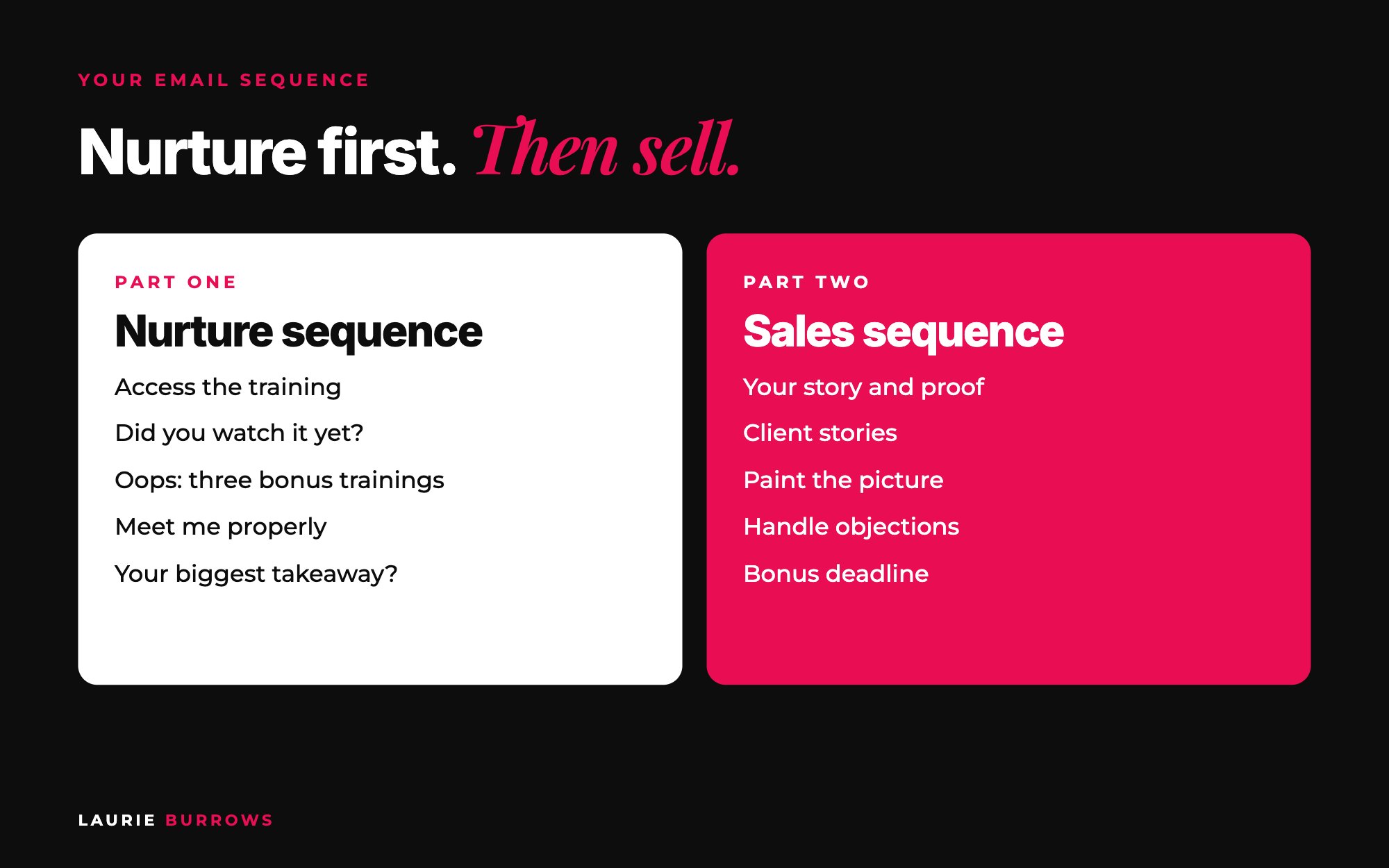
| When | Subject line | Job | |
|---|---|---|---|
| 1 | Straight away | You're in: here's your training | Access, why to watch, PS to $27 offer |
| 2 | 24 hours later | Did you get a chance to watch this yet? | Nudge, link again, PS with more on the $27 offer |
| 3 | Day 2 | Oops! | "I forgot to link some extra trainings": three short trainings |
| 4 | Day 3 | If you're new around here... | Introduce yourself properly and why you're the expert |
| 5 | Day 4 | What's been your biggest takeaway? | Hit reply: market research and conversations |
| 6 | Day 5 | Want me to look at yours? | Free audit or a reason to follow you and DM a keyword |
Copy and paste: nurture emails 1 to 3
Email 1. Subject: You're in: here's your training. Hi [name], welcome to [training name]! This training is going to change the way you think about [topic]. Inside, you'll learn [result in bold] without [what they hate]. [Watch the training]. Important: carve out [x] minutes to watch it properly. [Watch now]. PS. Want to get results even faster? [$27 offer name] gives you [quick win] for just $27: [link]
Email 2. Subject: Did you get a chance to watch this yet? Hi [name], just checking in. Did you get a chance to watch [training] you signed up for yesterday? If not, no worries, but it's too valuable to sit in your inbox. Here's the link again: [link]. PS. Inside [$27 offer] you get [item one], [item two] and [item three]: [link]
Email 3. Subject: Oops! Hi [name], I realised I forgot to link up a few extra trainings in yesterday's email, and I didn't want you to miss them: [Training one: title]. [Training two: title]. [Training three: title]. PS. [$27 offer reminder]
Copy and paste: nurture emails 4 to 6
Email 4. Subject: If you're new around here... Hi [name], since you joined [training], I wanted to officially introduce myself. [Your story in four or five lines, with your best result in bold.] That's why I teach [method]. PS. [Link to your podcast, Instagram or a favourite training]
Email 5. Subject: What's been your biggest takeaway? Hi [name], I'd love to know what's been your biggest takeaway from [training]. Was it [point one], [point two] or [point three]? Hit reply and tell me. I read every message.
Email 6. Subject: Want me to look at yours? Hi [name], I'm gifting [number] free [audits / reviews] this week. I'll tell you what is and isn't working in your [area]. Want one? Follow me on [platform] and DM me the word AUDIT.
Email 3 always gets a high open rate, and it tells you which training your audience clicks most. Email 5 starts conversations, and conversations lift your conversion rate. If someone replies "the content system", you can point them to a $27 offer on exactly that, or ask what led them to opt in. Full breakdown in the nurture sequence I use after every opt-in, and the audit route in the free audit strategy.
Writing six emails in your own voice takes most people a full day. The Email Marketer inside Ascendia OS writes your welcome and nurture sequence and your follow up for you, so you're editing rather than starting from a blank page.
Time: A day to write, or an afternoon with your webinar transcript and AI. Done when: six emails are scheduled and every link has been clicked by you.
Step 8: The sales sequence (6 emails)
Then we transition into selling the core offer. Ask yourself: what would you need to hear to say yes to someone's programme? The sales sequence shows people why they need to work with you, using stories, results and testimonials, it handles objections, and it uses real bonuses to encourage a decision. Every sales sequence I write includes your story again, testimonials, a paint the picture email, objection emails and bonuses.
| Type | What it does | |
|---|---|---|
| 7 | Your story | How you did it, why you're the authority, a screenshot as evidence. Hint at the programme. |
| 8 | Client story or testimonial | Where they were, what changed, where they are now. "Want results like this?" Fast action bonus. |
| 9 | Paint the picture | "Imagine waking up to payment notifications..." then bring them back to reality: you're not there yet, are you? |
| 10 | Price objection | Opportunity cost, value against price, and the daily cost. |
| 11 | Time objection | Why not having time is exactly why they need it. |
| 12 | Bonus ends or final call | Recap, the deadline, one clear link. |
Copy and paste: sales emails
Paint the picture. Subject: Picture this for a second. Hi [name], imagine waking up to [payment notifications / a full calendar], even on the days you're not working. [Two or three vivid lines.] Now be honest. You're not there yet, are you? You're still [current reality]. That's exactly what [offer name] fixes. [See how it works]
Price objection. Subject: Less than a coffee a day. Hi [name], let's talk about the money. [Offer] is $[price] for [length]. That works out at around $[x] a day. Less than a coffee or a meal deal. Now put that next to [end result]. You can keep piecing it together from free videos and be in the same place in six months, or take the shortcut now. [Join here]
Time objection. Subject: "I don't have time". Hi [name], if you don't have time, that's exactly why you need this. [How the offer saves time.] Keep telling yourself the same reasons and you'll keep getting the same results. [Join here]
Worked example: the daily cost. A $1,000 programme that runs for six months is $1,000 divided by about 180 days, which is less than $6 a day. Put $6 a day next to an end result like "consistent $10k months" and the price objection usually disappears.
Match the call to action to the price. The higher the price, the more personal the sale needs to be. Give people more than one route: the sales page, a DM conversation and, for higher prices, a call. I once wanted to join someone's programme, but the only way to get the price was to book a call with their team. I don't book calls, so I didn't buy. Never force one route on everybody.
One technical tip: keep links in each email to a minimum. Lots of links and calls to action increase the chance of landing in promotions or spam. One clear link to one page is better. For handling objections in conversations, see how to handle the 5 most common sales objections.
Time: A day to write. Done when: six sales emails are scheduled after the nurture sequence, each with one link.
Step 9: The monthly virtual event
Some people will go through the whole funnel and still not buy. That's normal. Around once a month (or every two weeks), invite everyone who hasn't bought to a live virtual event and sell your core offer there. Some people just need to see you live before they decide, and live attendees buy far more. If they don't buy that month, invite them to a different one next month.
Step 10: Drive traffic every day
A funnel without traffic is a beautiful website nobody visits. It only works when people come into the top of it every day. Here's a simple plan.
| How often | Organic | Paid |
|---|---|---|
| Daily | One piece of content with the free training as the call to action; reply to comments and DMs with the link | Ads running from $5 a day to the opt-in page |
| Weekly | A story or result post, a post in relevant Facebook groups, one collaboration or live with someone else | Check cost per lead and which ad is winning |
| Monthly | Two to four guest spots on podcasts, summits or other people's memberships | Test one new ad; scale the winner |
Getting in front of other people's audiences is my favourite, because their audience trusts you by association. And paid ads are where it becomes properly passive. They sound scary, but you can start from $5 a day, and your low priced offers pay for them. See the $5 a day ads strategy.
One tip that saves a lot of guessing: duplicate your pages for each traffic source. I have one version for organic, one for ads and one for live launches, so I know exactly where sales come from.
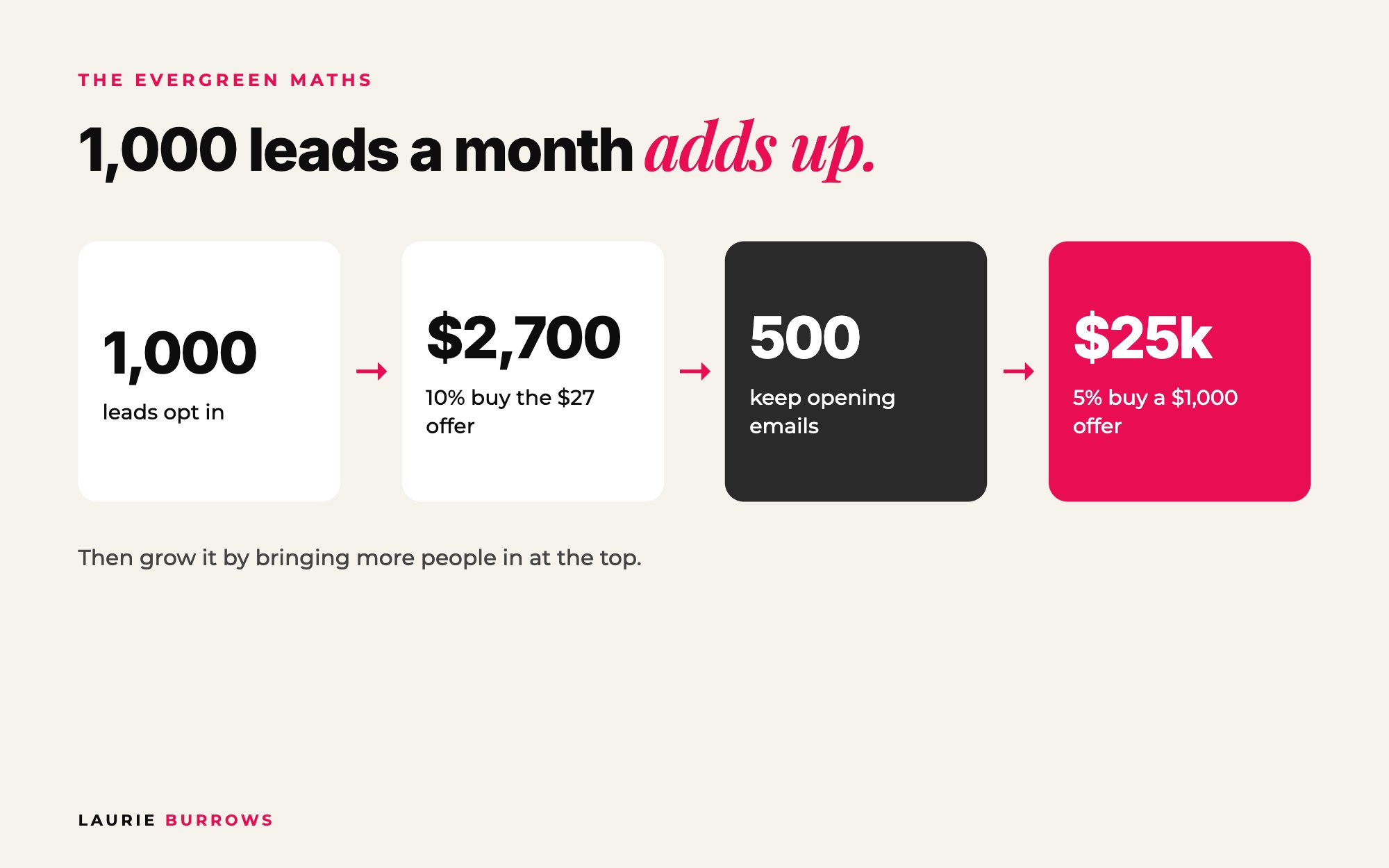
The numbers: a worked example
Here's quick maths so you can see the potential. Say you get 1,000 leads into your funnel in a month.
| Stage | Benchmark | Result |
|---|---|---|
| Leads | 1,000 | |
| Buy the $27 thank you page offer | 10% | 100 buyers = $2,700 |
| Tick the $11 order bump | Aim for around 80% | 80 x $11 = $880 |
| Keep opening your emails | 50% | 500 people nurtured |
| Buy a $1,000 core offer | 5% of those 500 | 25 sales = $25,000 |
That's one month, from one system, before any upsell or virtual event. The low priced offers can cover your ad spend for those 1,000 leads, or go in your pocket. Then you grow it by bringing more people in at the top, which you can afford because the low priced offers are funding it.
Smaller example: 200 leads a month. At 8% on the thank you page, that's 16 buyers and $432, plus bumps. If 100 keep opening and 5% buy a $1,000 offer, that's 5 sales and $5,000. Same system, smaller top of funnel. To work backwards from your goal, use Lead Mapping: divide the sales you want by your conversion rate, and that's your leads target.
Benchmarks to aim for
| Stage | Aim for |
|---|---|
| Opt-in page conversion | 40% or more of visitors |
| Thank you page offer | 8 to 10% of opt-ins |
| Order bump | 70 to 80% of buyers |
| Funnel email open rate | 40 to 50% |
| Opt-in to sale (overall) | Around 3% as a starting average |
| Thank you page price | $27 (test $17 to a little higher) |
| Order bump price | $11 to $17 |
| Upsell price | $47 to $97 |
The biggest mistakes (and the fix)
- Selling too soon. I once looked at a funnel someone had paid a lot of money to have built: opt-in page, then straight onto a thank you page selling a $2,000 programme, then emails that never nurtured. Fix: free training, $27 offer and nurture before the big ask.
- Building the funnel before the offer. Fix: start with an EVP core offer that's joinable any day.
- A freebie that doesn't match the core offer. Fix: same end result, smaller scope.
- An empty thank you page. Fix: deliver the training, then "but wait, there's more".
- No post purchase page. Fix: three clear next steps.
- Forcing one way to buy. Fix: sales page plus DM conversation (plus a call for high ticket).
- No traffic plan. Fix: daily organic actions and $5 a day ads.
- Changing everything at once. Fix: change one thing, measure, then the next.
Troubleshooting: if your funnel isn't working
| If this is happening | Check this first |
|---|---|
| Few people reach the opt-in page | Traffic. Are you posting daily with the free training as the call to action? Are ads on? Any guest spots this month? |
| Opt-in rate under 40% | The headline. Is it about the end result, clear and bold? Is the form in the hero section? Does it work on mobile? |
| Few people buy the $27 offer | Is it the next logical step from the freebie? Is "but wait, there's more" obvious? Is the training on the page distracting them? Test sending it by email. |
| Low order bump uptake | Price (keep it lower than the first offer) and relevance (does it make the $27 offer faster or easier?). |
| Low email opens | Subject lines and deliverability. Fewer links per email, and check your emails aren't landing in spam. |
| Opens but no clicks | One clear call to action per email, highlighted, with bold on the key result. |
| Nurtured leads, no core offer sales | The sales sequence: story, testimonial, paint the picture, objections, bonus. Then add a DM route and a monthly virtual event. |
| Sales but you don't know from where | Duplicate pages per traffic source and track each one. |
Your 30 day build plan
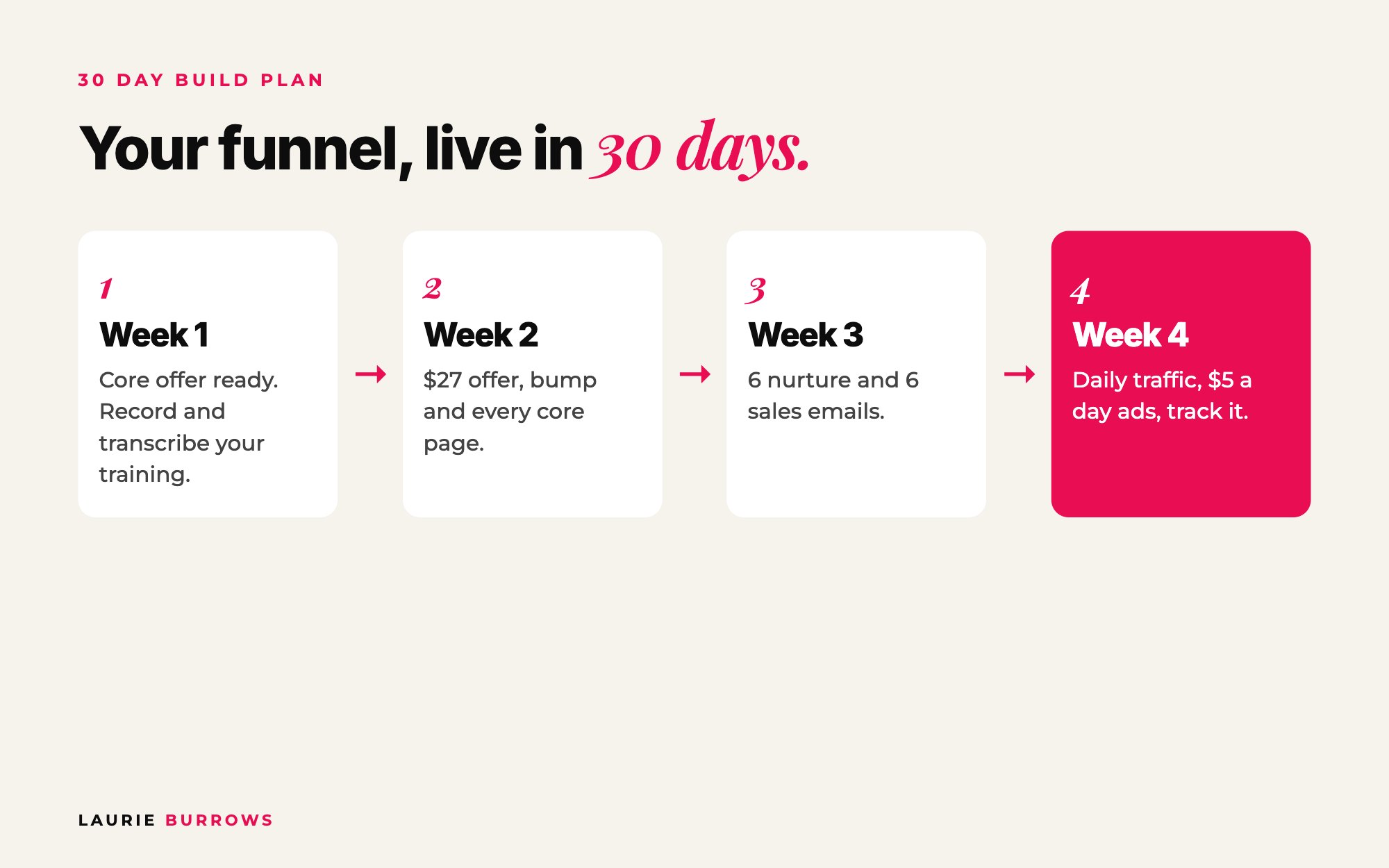
| Week | Build | Done when |
|---|---|---|
| Week 1 | Core offer joinable any day; record your free training; transcribe it | You have the recording and the transcript |
| Week 2 | Create the $27 offer and order bump; build opt-in, thank you, checkout, post purchase and training pages | You can go through the whole funnel as a test buyer |
| Week 3 | Write and schedule 6 nurture and 6 sales emails; core offer sales page | Every email is scheduled and tested |
| Week 4 | Turn on daily organic traffic and $5 a day ads; track every number | You have your first week of data |
Your action plan
Today
- Write your core offer statement and check it can be joined any day.
- List what you already have against the minimum Freedom Funnel.
- Choose your free training title, led by the end result.
This week
- Record your free training and transcribe it.
- Create your $27 offer and your $11 to $17 order bump.
- Write your opt-in page and thank you page using the templates above.
Next 30 days
- Build every core page and run through it as a test buyer.
- Schedule the 12 emails.
- Start daily traffic and $5 a day ads.
- Track opt-in rate, $27 offer rate, bump rate, opens and core offer sales, and improve one thing at a time.
Honestly, the tech is the hardest part. Once it's done, though, it's done. You might tweak and optimise, but you're not rebuilding it every month like a launch. That's a big part of why I built Ascendia OS: the Funnel Builder builds the opt-in, thank you page, checkout, order bump and upsell, the Email Marketer writes the 12 emails, and the pages, emails and CRM all sit in one login. Whatever you use, get the core pages live, let people go through it, then improve it. Guessing and hoping isn't a strategy.
If you want the whole system for turning content into repeat sales, with every tool and template, that's exactly what Content To Clients® is for.
Want the full sales system done with you?
Content To Clients® is my complete system for turning your content into repeat sales: the funnel, the $27 offers, the email sequences and every tool and template to put it in place.
Rather have it done for you?
Let Ascendia OS build your Freedom Funnel for you
The Funnel Builder builds your opt-in page, thank you page offer, checkout, order bump and upsell inside your account, the Copywriter writes the page copy in your voice, and the Email Marketer writes your nurture and sales sequences. 14 days free, no tech skills needed.
Frequently asked questions
What is the Freedom Funnel?
The Freedom Funnel is my evergreen sales system for coaches, consultants and online service providers. It uses a pre-recorded webinar behind an opt-in page, a $27 thank you page offer, an $11 to $17 order bump, an optional upsell, then a nurture and sales email sequence that sells your core offer every day.
Do I need a webinar for an evergreen funnel?
You don't have to, but I highly recommend it. A webinar lets you give more value, share your story and build connection, and you can structure it to sell. You can also transcribe it and turn it into your page copy and emails.
How much should my thank you page offer cost?
Around $27 is what's worked best in my testing, with an $11 to $17 order bump at checkout. The price needs to be low enough that someone who's only just found you will buy on impulse. Test your own audience, because your numbers may differ.
What conversion rates should I expect?
As starting benchmarks: 40% or more on the opt-in page, 8 to 10% of opt-ins buying the thank you page offer, 70 to 80% of buyers taking the order bump and 40 to 50% email opens. Core offer conversions depend on your price and your nurture, so track your own numbers monthly.
How many emails do I need?
Around six nurture emails and six sales emails is a solid start. Each email has one job and, ideally, one link. Use your open and click data to swap out what isn't working.
How long does it take to build an evergreen funnel?
With the 30 day plan above you can have the core live in a month. The tech setup is the slowest part, so focus on the minimum first and add upsells and virtual events once it's working.
How do I get traffic to my funnel?
Daily content with the free training as the call to action, guest spots in other people's audiences, collaborations and Facebook groups, plus ads from $5 a day once the pages are converting. Your low priced offers help pay for the ads.
Can an evergreen funnel replace launches?
It can be your main source of daily sales, and many people run it alongside a couple of live launches a year. The evergreen funnel smooths out your revenue, and launches give you spikes on top.
Laurie Burrows is a revenue growth strategist for coaches, consultants and online service providers, with 15 years of experience in marketing and sales and a business that's generated multi-seven figures in sales. She's the founder of Ascendia OS.
Do you want to scale your business to 10K months in the next 90 days? I am looking for 10 people for my new case study program. DM me the word CASE STUDY on Instagram (@_laurieburrows) to learn more.