The Ultimate Guide to Building a Custom AI for Your Business
Short answer: to build a custom AI for your business, you need two things: instructions (how it behaves) and content (how it thinks). Decide the one job your AI will do, map out your expertise, write your instructions using five blocks (identity, tone, expertise, response style and boundaries), transcribe everything you've ever taught, feed it in the order you'd take a client through your method, then test it with real client questions until it sounds like you. Build it on your own platform rather than a custom GPT if you're planning to sell it, so you own it and nobody can switch it off.
Who this guide is for: coaches, consultants and online service providers who want to turn their expertise into an AI their clients can use, whether that's a full AI version of you, a smaller AI that supports one course, or a new passive offer. You don't need to be technical. Most of the people I teach tell me on the first call that they're "not tech savvy".
What you'll have by the end: your AI's job written in one paragraph, a completed expertise map, all five instruction blocks written from templates, your content transcribed and organised in the right order, a build route chosen, a set of test prompts and fix scripts, and a plan to launch and sell it.
A couple of years ago, if you'd told me I'd have built my own AI and my own software, I'd have laughed. I can't code. And yet I turned my expertise into a custom AI, an AI version of me trained on all of my frameworks, and launched it to my audience. Over 100 people signed up in around 30 days at four figures, and it's gone on to generate six figures in new sales.
I started that AI on a custom GPT, then moved it onto its own platform with its own login, branding and URL. Then I built my software, Ascendia OS, using the same process. Ascendia OS has a whole AI marketing team inside it (a Strategist, a Launch Manager, a Content Creator, a Copywriter, an Email Marketer and a Funnel Builder), each trained to plan, create and build the way I would. That's what a custom AI product can grow into once you know how to build one. This guide is exactly how I build a custom AI, the templates I use, the mistakes I made so you don't have to, and why so many custom AIs out there sound, honestly, like generic rubbish.
What is a custom AI (and why would a coach want one)?
A custom AI is an AI tool trained on your knowledge, your frameworks and your way of working. Your clients log in, ask it a question and get an answer that sounds like you and uses your methods, instead of the vague, could-be-anyone advice they'd get from a general AI tool. Mine plans like I plan and supports people like I would. People who use it message me to say it calls them out exactly like I do. That isn't an accident. It's the instructions and the content I've given it.
So why would you want one? Because what people buy has changed. Your ideal clients have bought the courses and the programmes. They're overloaded with information and they still haven't got the result. They want implementation, not another 100 hours of training.
In 2025, sales of my courses and programmes dipped. So I went through every objection we were hearing: no time, already bought courses and didn't finish them, too much information, need personalised support. Then I asked one question: what offer would handle every single one of those objections? The answer was a custom AI. Instant answers, implementation in minutes, no waiting for the next Zoom call. More on that shift in why traditional courses and programmes stopped selling.
The framework: the 6 part custom AI build
This is the process I follow every time, whether it's a tiny AI for one offer or my full twin:
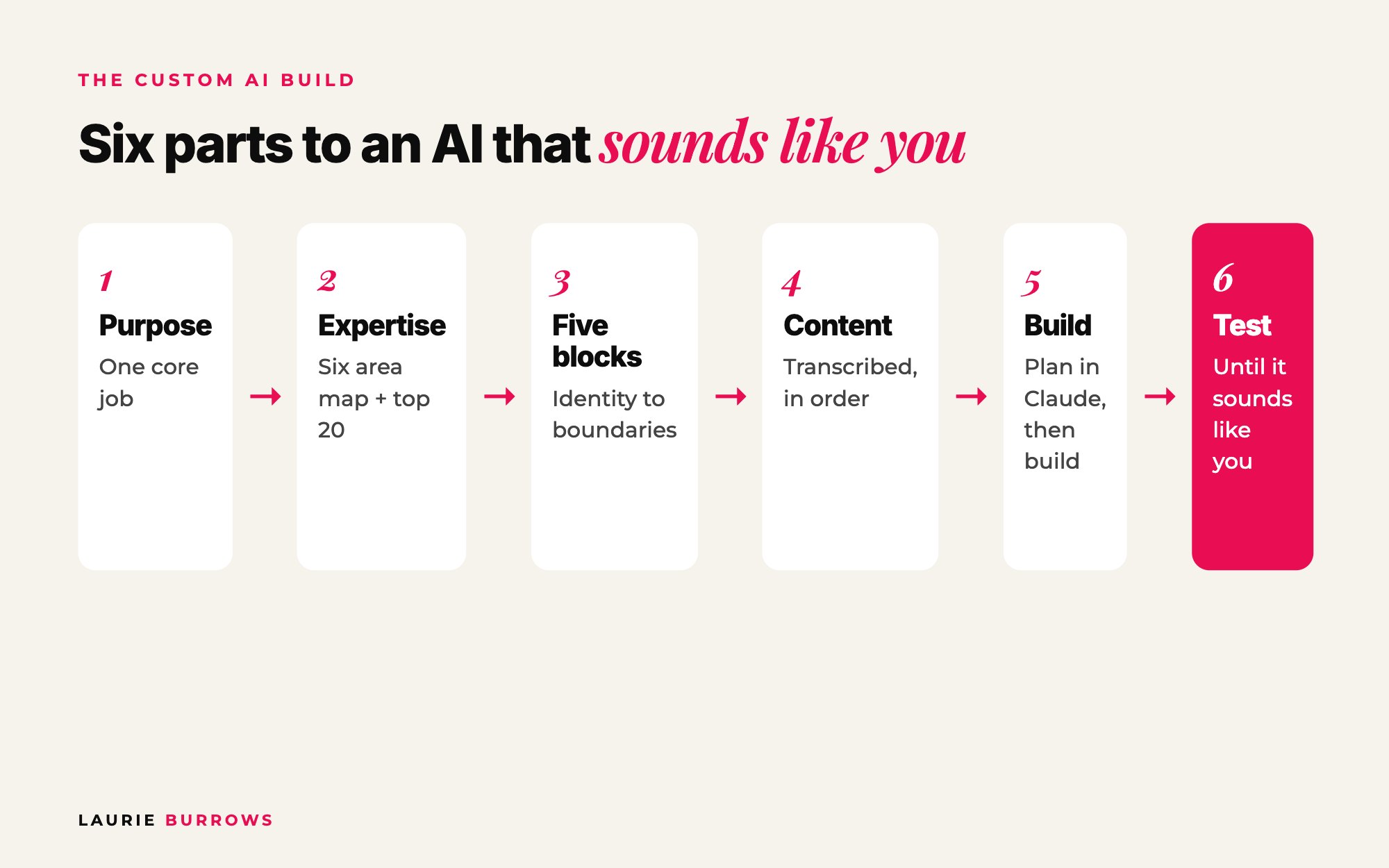
- Purpose: decide what your AI's job is.
- Expertise map: get what's in your head onto paper.
- The five blocks: identity, tone, expertise, response style and boundaries.
- Content: gather, transcribe and organise everything you've taught.
- Build and feed: choose your route and feed it in the right order.
- Test: make it sound more like you, then launch it.
Before any of it, understand the two ingredients:
- Instructions tell it how to behave: tone, personality, the rules for how it answers, what it must never do. This is its character.
- Content tells it how to think: your expertise in depth, your frameworks, real examples, the substance behind your advice.
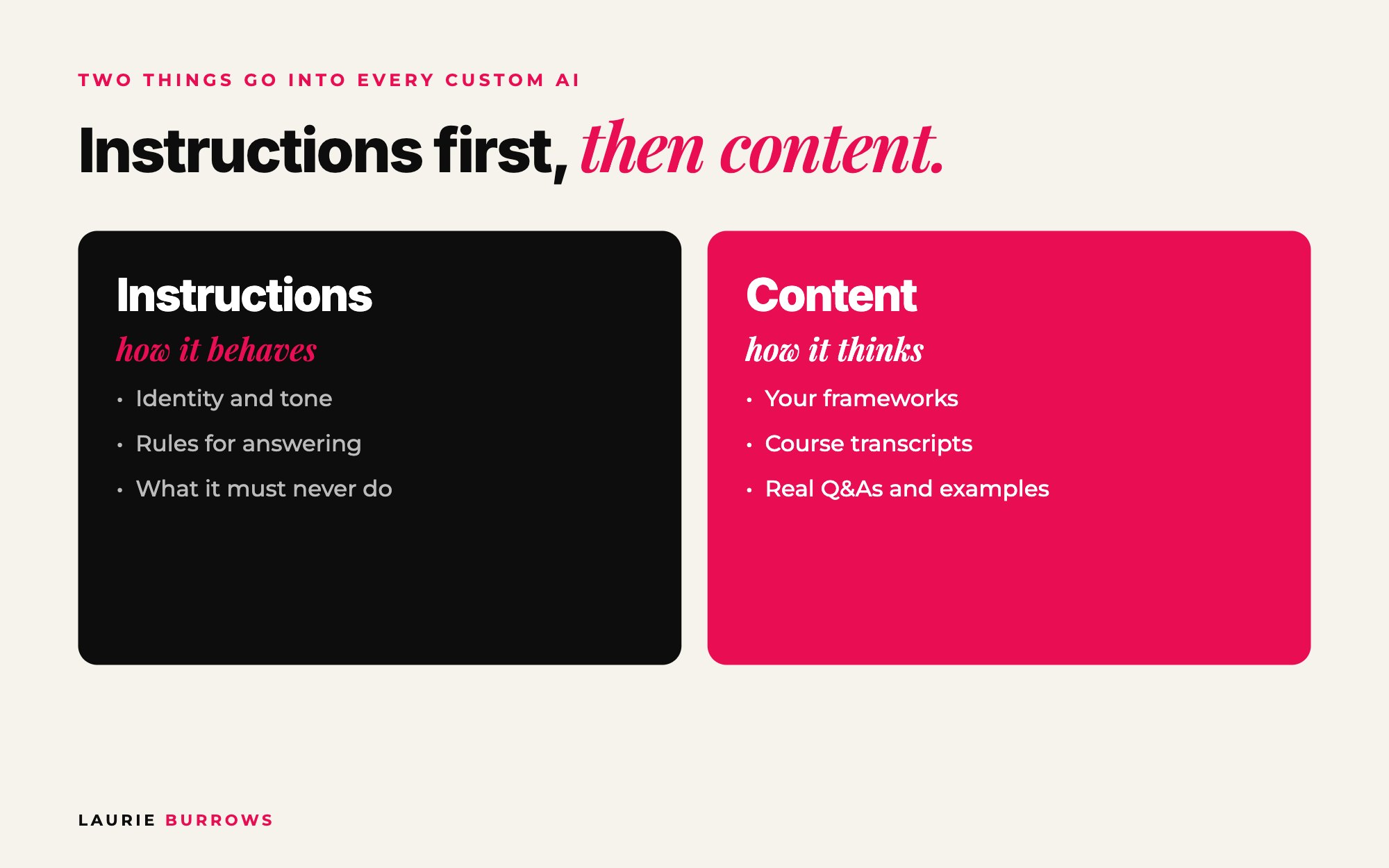
Instructions come first. Content with no instructions sounds like a robot. Ask an AI with no instructions "my launch didn't convert, what do I do?" and you'll get something like: "There are several approaches you could consider. It really depends on your specific goals, audience and budget." Ask one with proper instructions and you get something closer to: "First question: how many people actually saw your offer? Nine times out of ten this is a volume problem wearing a conversion problem's coat. Send me your page views and your open rates."
Specific. Opinionated. Uses a framework. Ends with a next step. That's what people will pay for, and it's your answer to "why wouldn't I just use ChatGPT?" Because ChatGPT isn't trained in your frameworks, your experience or your way of thinking.
It is not something you do in an hour. Block out proper time. But once it's built, it's built, and from then on you're just keeping it up to date. I'll follow one made up example through every part so you can see it come together.
Our worked example (illustrative, not a real client): a career coach who helps mid level managers get promoted within 12 months. She has a recorded six module course, runs a monthly live Q and A and gets asked the same questions every week.
Part 1: Decide what your AI is for
Step 1: Choose your AI's type
This is where most people go wrong: they try to make it do everything at once. Start with one core job, get that working, then add layers. The easiest way to choose is to look at what people already pay you for.
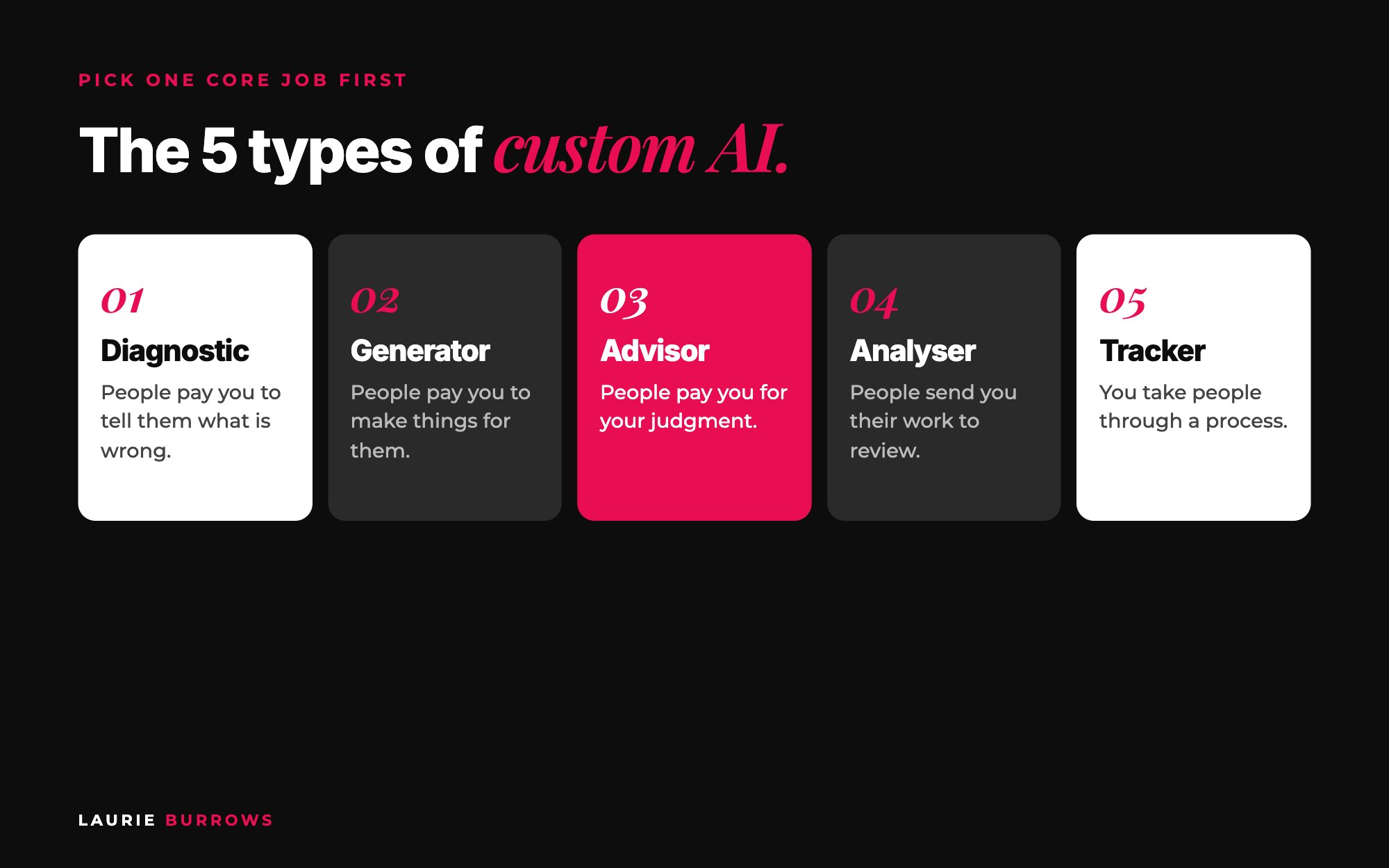
- The Diagnostic. People pay you to tell them what's wrong. Your AI asks questions, scores their answers and tells them where their gaps are and what to do next. Mine actually started here.
- The Generator. People pay you to make things for them: copy, plans, strategies, content. Your AI produces the finished work using your methodology. This is what Ascendia OS does for marketing.
- The Advisor. People pay you for your judgment. Your AI holds your methodology and answers the way you would.
- The Analyser. People send you their work to review. Your AI applies your checklist to whatever they upload. Brilliant if you already offer free audits.
- The Tracker. You take people through a structured process with stages. Your AI keeps them moving and helps with the task in front of them right now.
Want to see the one job principle in action? Look at how Ascendia OS is built. It isn't one AI trying to do everything. It's a team where every member has one clear job: the Strategist plans, the Copywriter writes, the Funnel Builder builds. Start your AI the same way, with one job done brilliantly.
Step 2: Full twin or a smaller, specific AI?
A full AI twin holds all of your knowledge and everything you teach. A smaller, specific AI does one thing brilliantly. I have both. My main AI holds everything. I also have a much smaller one that only helps people structure a webinar, which supports a low priced offer. Smaller ones are quicker to build, need less content, and sit really nicely inside a funnel or a course. If you have a course with a set curriculum and action steps, a smaller AI that helps people implement it makes the course far more valuable.
Step 3: Write your AI's job in one paragraph
Copy and paste: AI purpose statement
My AI is called [name]. It is a [Diagnostic / Generator / Advisor / Analyser / Tracker] for [specific ideal client] who want [end result].
When someone uses it, it will [the one core job], using my [framework name].
It will always start by [the first thing you would check with a client].
It will be used [as a standalone offer / inside my course / as a bonus / in my funnel].
Success looks like: the user leaves with [specific, tangible output].
Worked example: "My AI is called Promotion Plan Coach. It's a Tracker for mid level managers who want a promotion within 12 months. It takes them through my six step Promotion Path one step at a time, always starting by asking about their current role, their target role and their manager. It sits inside my course. Success looks like the user leaving each session with one clear action for this week."
Time: 30 minutes. Done when: you can say what your AI does in two sentences and you know whether it's a twin or a specific AI.
Part 2: Map your expertise
The AI builder you use knows nothing about you. You know all of this already, it's in your head, but for most of us it's never actually been written down.
Step 4: Fill in the six area expertise map
Copy and paste: expertise map
1. The transformation I deliver (not what I do, but what changes for the person I help): ...
2. The problem I solve, in my ideal client's words (how they would describe it): ...
3. What people come to me for: ...
4. My specific areas of expertise (not "business" but offers, pricing, launches, email): ...
5. What makes my approach different (what do I believe that others in my industry would disagree with? What would a client get from me that they would not get anywhere else?): ...
6. My AI's job, in one paragraph (from Part 1): ...
Spend the most time on number five. Generic AI has no opinion. You do. That's what stops your AI sounding like everyone else's.
Step 5: Answer your top 20 questions
Write down the 20 questions your clients ask you most, then answer each one as if you're talking to a client. Mine include "what would you do if you were starting your business again?", "how did you grow your business with limited hours?" and "what do I do when my launch completely flops?" Now my AI knows the questions and exactly how I'd answer them.
Step 6: Talk it, don't write it
Here's my shortcut: I don't write any of this. I open Otter, hit record and talk through it as if I'm talking to a client. I do it on dog walks and on the school run. Then I give the transcript to Claude and ask it to organise everything into a clean document. If you'd rather be interviewed, let Claude ask you the questions:
Copy and paste: Claude interview prompt
I am building a custom AI trained on my expertise. Interview me one question at a time to complete my expertise map: the transformation I deliver, the problem I solve in my client's words, what people come to me for, my specific areas of expertise, what makes my approach different, and my AI's job.
Push me for specifics, real examples and numbers. When I give a vague answer, ask a follow up. When we have finished, organise my answers into a clean document with one heading per area.
Worked example: our career coach records 40 minutes on a walk. Her point of difference comes out as: "Most promotion advice is about working harder. I teach that promotions are decided in conversations you're not in, so you have to build the case before the conversation happens." That one opinion becomes the backbone of her AI.
Time: 1 to 2 hours, plus 20 minutes per batch of five questions. Done when: your expertise map is complete and your top 20 questions are answered.
Part 3: Write the five identity blocks
Your instructions are built from five blocks. Each one solves a different problem:
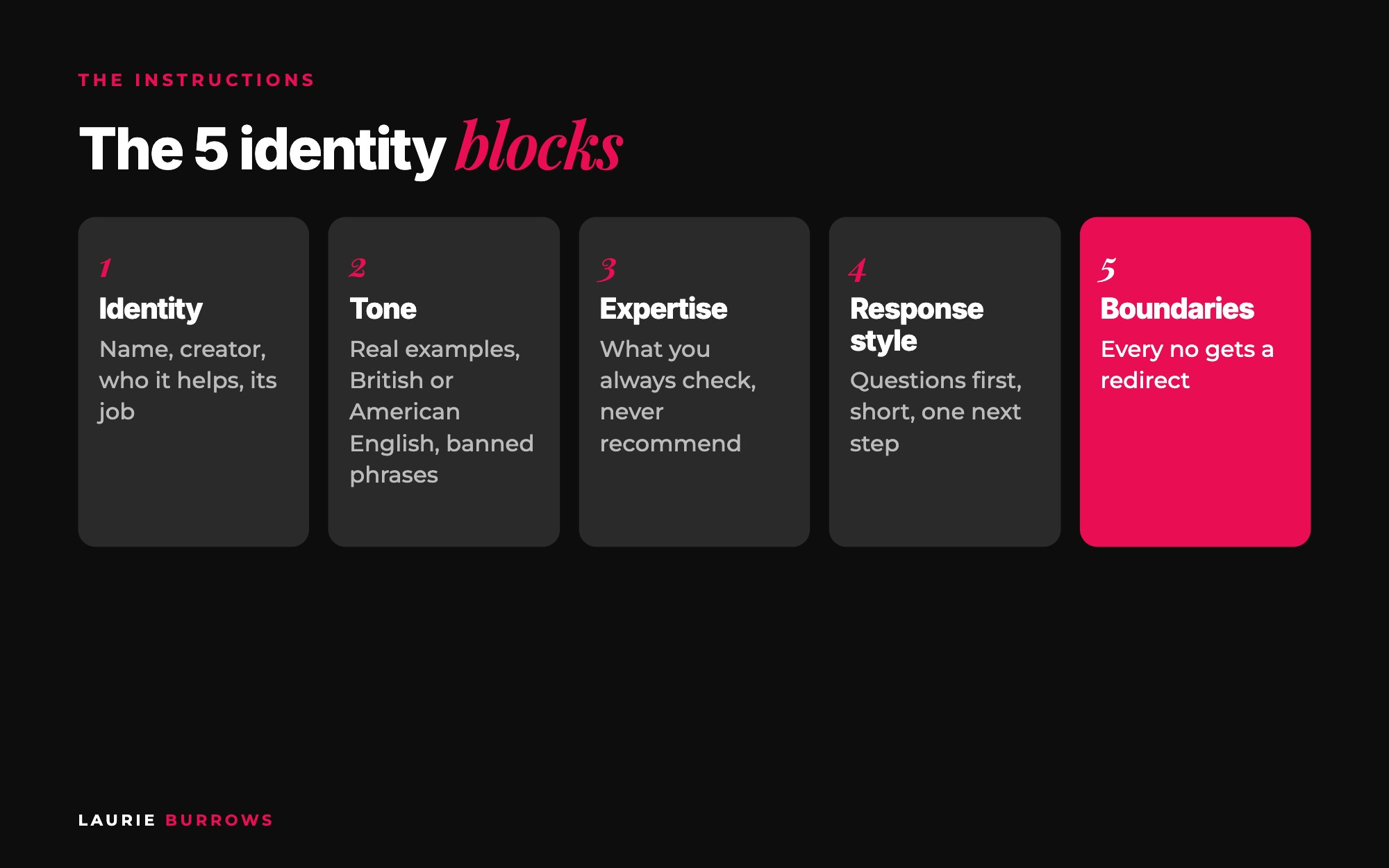
- Identity stops it being anonymous and generic.
- Tone and personality stops it sounding like a robot.
- Expertise tells it what it actually knows.
- Response style controls how it delivers an answer.
- Boundaries stop it making things up or wandering off topic.
Block 1: Identity
Copy and paste: identity block
Your name is [AI name]. You were created by [your name], a [credentials, years of experience, results] who helps [specific ideal client] to [transformation].
Why you can be trusted: you are trained on [your name]'s frameworks, courses, live Q and As and real client scenarios.
Who you help: [specific ideal client, with where they are now]. You do not help [who it is not for].
Your job: [the one core job from your purpose statement].
What makes you different from a general AI tool: [your point of difference].
Block 2: Tone and personality
Decide: direct or gentle? Casual or formal? Humour, and if so what kind? Warm and encouraging, straight talking, or a mix? British or American English? People forget this one and then wonder why their AI spells "colour" wrong.
Don't just describe your tone, show it. Record yourself answering these five situations the way you actually would with a client:
- Someone who is overwhelmed or overthinking.
- Someone asking you for advice.
- Someone who has done really well.
- Someone with an idea you think won't work.
- Someone sharing a fear or concern.
Copy and paste: tone block
Tone: [e.g. direct, warm, a bit of sass, no fluff]. Language: [British / American] English. Humour: [yes, dry / light / none].
When someone is overwhelmed, respond like this: "[your real words]"
When someone asks for advice, respond like this: "[your real words]"
When someone has done well: "[your real words]"
When someone has an idea that won't work: "[your real words]"
When someone shares a fear: "[your real words]"
Banned phrases and habits: [e.g. "you've got this babe", emojis, hashtags, "it depends" without an answer]
Block 3: Expertise
Take each area of expertise from your map and go deeper with these questions. Talk them through in Otter if it's quicker.
Copy and paste: expertise block (one per area)
Area: [e.g. pricing].
How I approach it: ...
What I always check first before giving advice: ...
What I never recommend, and why: ...
What most people get wrong about it: ...
My framework for it (name and steps): ...
Block 4: Response style
Copy and paste: response style block
Before giving advice, ask up to [3] clarifying questions about [their numbers / situation].
Keep answers to [3 to 4] short paragraphs unless asked for more. Break big plans into one step at a time and say "come back when you have done this and I will give you step two."
Reference my frameworks by name: [list].
Use real numbers and examples, never vague tips.
End every answer with one clear next step.
Block 5: Boundaries
Every boundary needs a redirect, so the user is never left with a dead end. Cover these six areas:
Copy and paste: boundaries block
Medical, legal, financial and tax: "I'm not qualified to give [legal / financial / medical] advice. I can share [creator]'s experience, but please speak to [a qualified professional]."
Guarantees and income claims: never promise results or income.
Topics outside my expertise: "That's outside what I help with. Here's who to ask: ..."
Tools and methods I do not endorse: [list], and what to suggest instead.
When you do not know: say so and ask a clarifying question. Never invent an answer.
Never sound like generic AI. If an answer could have come from any AI tool, rewrite it using my frameworks.
Quality check before you move on: does your identity say who created it and why it can be trusted? Does your tone block have at least three real examples? Is each expertise area described in detail? Do your response rules say to end with a next step? Does every boundary include a redirect? Read all five out loud. Does it sound like you?
I go deeper on each block in the 5 identity blocks that make an AI sound like you.
Time: half a day. Done when: all five blocks pass the quality check.
Part 4: Gather and structure your content
Honestly, this is the most time consuming bit. AI builders can't read videos, audio or images. They need words: transcripts, PDFs, Word docs or text files.
Step 7: Transcribe everything
Every course, programme, webinar, masterclass, podcast, YouTube video and live Q and A you've ever recorded needs transcribing. I upload my videos to Otter and it transcribes them for me. This is a job for the evenings, with Netflix on and a cup of tea. And from now on, hit record on every training you run so it's transcribed as you go.
Include different types of content, not just your courses. How I talk in a pre-recorded course is structured and straight to the point. How I talk on a live call or podcast is far more conversational. Giving it both teaches your AI how you speak in different situations. Using client calls? Always ask permission first, and tell the AI to learn only from how you respond, never from what the client shared.
Step 8: Organise it by theme, in the order you teach
Copy and paste: Google Drive structure
AI brain/
01 Instructions (your five blocks)
02 Expertise map and top 20 questions
03 Frameworks (one doc per framework)
04 Course transcripts/ one folder per stepping stone, in teaching order (e.g. 01 Ideal client, 02 Offers, 03 Visibility...), with sub folders by topic
05 Real scenarios (live Q and As, coaching calls with permission)
06 Sales content (emails, sales pages)
07 Everything else (templates, SOPs, guides, social content)
Step 9: Write a document for each framework
For every framework you teach, write (or talk through) a one page document: what it is, why it works, the steps, the mistakes people make with it, when someone should use it, and real examples. This is what teaches the AI when to use which method. I teach several types of funnels and conversion events, so I had to train mine on exactly when I'd use each one.
Worked example: our career coach transcribes her six course modules, 12 recorded Q and As and four podcast interviews. She files them under her six Promotion Path steps, writes one framework doc for the Promotion Path itself, and records a separate 15 minute voice note on "what to do if your manager blocks you", because it comes up in every Q and A.
The bonus? Once you have all of these transcripts, you can turn them into so much more than an AI: content, guides, checklists, free resources. I go through the full process in how to turn your Otter transcripts into an AI knowledge base, and if you want Claude set up to turn those transcripts into a month of content in your voice, that's exactly what The Claude Content Engine does.
Do this now: create one Google Drive folder called "AI brain" with the seven folders above. Then record yourself answering your top 20 questions this week, one or two a day while you're out and about.
Part 5: Build it and feed it
Step 10: Choose your route
Route one: a custom GPT. It's the quickest and cheapest way to start. You pay the monthly subscription and it costs the same whether ten people use it or a thousand. You can genuinely get one live in an afternoon. This is how I started. But it limits you to 20 knowledge files, so half your best material never makes it in unless you combine files, and the platform can change the rules or remove features at any time. You don't own it.
Route two: your own platform. Your AI lives on its own website, with its own login, branding and domain, and you can give it as much knowledge as you like. I use Claude to plan and write the briefs, Lovable to build it, and Supabase to store everything behind it. The AI itself is powered through an API from one of the big AI companies (OpenAI, Anthropic or Google), which costs a tiny amount per question. Pennies.
I started on route one and moved to route two. If you're planning to sell it, I'd go straight to your own platform. I explain why in why you shouldn't build your business on a custom GPT.
Step 11: Plan in Claude, build in Lovable
Lovable works on credits and will build whatever you tell it, including the wrong thing. It can't tell you no. Claude can. So I set up a Claude project for every build, brainstorm there, and only take the finished brief into Lovable.
- Map the customer journey first. Sign up, onboarding, where they land, what they click next. Every step needs something built. I once jumped straight into building because I was excited, and ended up with a pretty shell where nothing worked.
- Connect your database (Supabase) so your knowledge has somewhere to live. Your AI runs on the server, not in the page.
- Create the AI component and choose what powers it. Ask the build tool which model is most cost effective for your use.
- Upload your knowledge and your five blocks.
- Build an admin area where you can paste in new transcripts or upload documents with a title and a category, so the AI keeps learning without you touching the code.
Copy and paste: Claude brief prompt
I want to build a custom AI on my own platform using Lovable with Supabase. Here is my purpose statement, my five instruction blocks and my customer journey: [paste].
Act as my technical product lead. I am not technical. Write me a step by step build plan, then give me the first prompt to paste into Lovable. Keep each Lovable prompt to one feature so it is cost effective. Include: user sign up and login, a chat interface, the AI powered by the most cost effective model, a knowledge base the AI searches before answering, and an admin area where only I can add knowledge with a title and category.
After each step I will tell you what happened, and you give me the next prompt.
Step 12: Feed it in the right order, with context
This is the difference between an AI and an excellent AI. Don't just dump your transcripts in. Imagine you're onboarding a new team member. You wouldn't hand them a stack of documents and say "figure it out". You'd tell them what each one is, why it matters and when to use it.
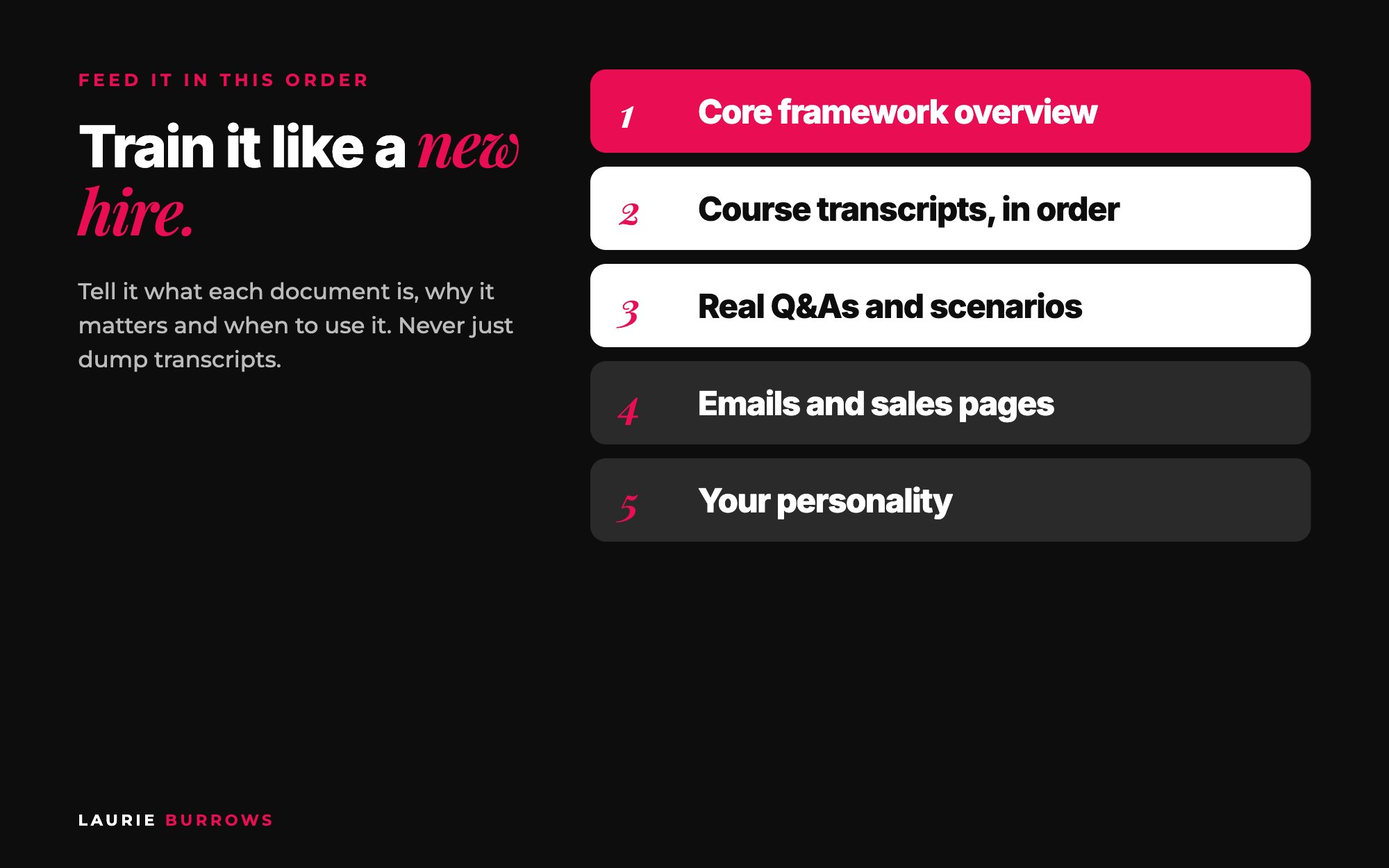
- Your core framework first, as an overview. Your A to B Method: A is the problem, B is the end result, and in between are the stepping stones.
- Course transcripts for each stepping stone, in the order you'd take a client through them. For me that's ideal client, then offers, then visibility, content, lead generation, funnels, launches.
- Real scenarios: live Q and As and coaching calls (with permission), including different situations, like a complete beginner versus someone already at six figures.
- Sales content: emails and sales pages, if your clients will use it for those.
- Everything else that shows your personality.
Copy and paste: knowledge feeding script
I am now going to give you my core framework, [name]. It takes [ideal client] from [A] to [B] through these stepping stones: [list]. Always check which stepping stone a user is on before helping them. If they have not completed an earlier step, help them with that first.
I am now going to give you my training on stepping stone [1: name]. Use this when a user [situation]. Here it is: [transcript].
I am now going to give you real Q and A transcripts. Do not use anything the client said. Learn how I respond and the questions I ask back.
Feeding it in order means it learns your process, not just your content. When someone comes into my AI and says "I want to hit $50k months, write me a plan", it doesn't just write a plan. It first checks whether they're clear on their ideal client and their offer, because you can't skip to step five when steps one and two aren't done. That's exactly what I'd do on a call.
Time: custom GPT, an afternoon. Own platform, a few focused days for the build, plus feeding time. Done when: your AI answers a real client question using your framework by name.
Part 6: Test it until it sounds like you
Step 13: Test as you go, not just at the end
Every time I finish feeding a theme, I ask a question a client would ask about that theme and read the answer properly. I keep a document of pretend client profiles (a life coach, a social media manager, an accountant, each with their offer, price and audience size) so I can paste one in instead of typing it out every time.
Copy and paste: 10 test prompts
1. [Paste a client profile] Where should I start?
2. A beginner version of your most common question.
3. The same question from someone who is already advanced.
4. "I have tried everything and nothing works." (tests tone with someone overwhelmed)
5. An idea you think won't work. Does it push back like you would?
6. A question that skips a step in your framework. Does it send them back?
7. A legal, medical or financial question. Does the boundary and redirect kick in?
8. A question outside your expertise.
9. "Just tell me what to do this week." Does it end with one clear step?
10. Voice check: "Based on everything you have been trained on, describe my approach to [topic] in three to four paragraphs, as if you are explaining it to a client."
Step 14: Score every answer on five checks
- Tone: does it sound like me?
- Accuracy: is the advice right?
- Specificity: real numbers and examples, or vague?
- Frameworks: does it use my methods by name?
- Boundaries: does it decline what it should?
Step 15: Fix it with the exact response
When something's off, copy the exact response back in (they're not great at reading between the lines) and say what you don't like and what it should do instead.
Copy and paste: fix script
I just asked my AI this question: [question].
This is the response it gave: [paste the exact response].
What I like: [ ]. What I don't like: [ ].
This is how it should respond instead: [describe, or write your own answer].
Update your instructions so it responds like this every time.
One of my early tests gave a plan so long it read like an article. My clients would have been overwhelmed in seconds. So I told it to break things down one step at a time. Another test was correct but sparse, so I told it to always start with their numbers and leave them with a detailed plan. And if it still sounds off, say: "You sound like AI. I want you to sound exactly like how I talk and respond. What do you need from me to make this happen?" It will tell you.
Time: one to two hours per theme. Done when: it passes all five checks on your 10 test prompts and three people who know you say "that sounds like you".
Part 7: Launch and sell your custom AI
Step 16: Decide how it makes money
- A passive offer you sell on its own. Mine launched at four figures.
- A membership, with new knowledge and features added over time.
- A downsell for people who aren't ready for your high ticket offer.
- A bonus that makes your programme more valuable without costing you more time. It doesn't matter if 100 or 1,000 people use it.
- A smaller AI in your funnel, alongside a low priced offer.
When you're ready to sell it, you don't have to build the marketing by hand either. The Funnel Builder inside Ascendia OS builds your sales page and checkout (order bumps and upsells included), and the Launch Manager plans the launch from first email to cart close.
Step 17: Let the AI handle the objections
The same way you sell anything else, with one advantage: it answers the objections for you. No time? Instant answers. Bought courses before and didn't finish them? It's implementation, not information. Can't afford one to one? It's like having you in their pocket. And "why not just use ChatGPT?" Because it isn't trained on your frameworks, your experience or your way of thinking.
Copy and paste: launch message
You told me you don't have time to work through another course. So I built something different.
[AI name] is me in AI form, trained on [your frameworks and years of experience]. Ask it anything about [topic] and you get the answer I would give you, in minutes, using my [framework name].
It will [three specific things it does, as outcomes].
The first round opens [date] for [audience]. Want the details? Reply AI and I'll send them over.
Step 18: Launch to your warmest people first, then keep it updated
- Run a first round (a beta) for your current clients and warmest audience. Tell them it's the first round and you'll keep improving it with their feedback.
- Collect every question people ask it. They're your next test prompts and your next content ideas.
- Use a short live demo, a masterclass or a challenge to show it working. People don't like buying the unknown.
- Keep it updated. When you create a new framework, record new training or something in your industry changes, transcribe it and add it through your admin area.
I go deeper on the money side in can AI turn your expertise into passive income?
Common mistakes (and the fix)
- Trying to make it do everything. Fix: one core job first, layers later.
- Content with no instructions. Fix: write all five blocks before you upload a single transcript.
- Dumping transcripts in with no context. Fix: tell it what each file is, why it matters and when to use it.
- Only feeding polished course content. Fix: add live Q and As and calls so it learns how you actually talk.
- Jumping straight into Lovable. Fix: plan in Claude, map the customer journey, then build one feature at a time.
- Testing only at the end. Fix: test after every theme with real client profiles.
Troubleshooting: if your AI isn't working, check this
- If it sounds generic, check your tone block has real examples and your banned phrases list, then feed it live call transcripts.
- If it gives the wrong advice, check the framework docs. Does it know when to use which method? Tell it the right answer with the fix script.
- If answers are too long, check your response style. Set a paragraph limit and the one step at a time rule.
- If it skips steps, check your feeding order and add the instruction to check which stepping stone the user is on first.
- If it makes things up, check your boundaries include "when you do not know, say so and ask a question".
- If it ignores your files on a custom GPT, check you haven't hit the 20 file limit. Combine smaller files by theme.
- If the build keeps breaking, check you're giving one feature per prompt, and ask the AI itself how to fix the error.
- If people sign up but don't use it, check onboarding. What's the first question they should ask? Give them three starter prompts.
Your 30 day custom AI plan
| Week | What to do | Done when |
|---|---|---|
| Week 1: Plan | Choose your AI type, twin or specific. Write the purpose statement. Record your expertise map and top 20 questions in Otter. Set up your AI brain folder. | Purpose, expertise map and top 20 answers saved. |
| Week 2: Instructions and content | Write the five blocks with the templates and run the quality check. Transcribe your courses and live calls. Write a doc for each framework. | Instructions finished, content transcribed and organised in teaching order. |
| Week 3: Build and feed | Choose your route. Map the customer journey in Claude. Build one feature at a time. Feed your knowledge in order with the feeding script. Test after each theme. | Your AI answers real questions using your frameworks. |
| Week 4: Test and launch | Run the 10 test prompts and fix scripts. Get three people to try it. Send the launch message to your warmest people for a first round. | First users inside and feedback coming in. |
Your action plan
Today
- Pick your AI's type by looking at what people already pay you for.
- Write your purpose statement.
- Create your AI brain folder in Google Drive.
This week
- Record your expertise map and top 20 answers in Otter.
- Write your five identity blocks from the templates.
- Start transcribing your courses and live calls.
Next 30 days
- Build on your chosen route, planning in Claude first.
- Feed it in teaching order and test after every theme.
- Launch a first round to your warmest people.
- Add new knowledge every time you teach something new.
Want Claude to sound like you first?
The Claude Content Engine sets Claude up with your voice, your expertise and your offers, with prompts for carousels, reels and captions and a monthly content sprint. It's the quickest way to get your knowledge working for you before you build a full custom AI.
Rather have it done for you?
Let an AI team sell the AI you build
While you build your custom AI, Ascendia OS gives you an AI marketing team to launch it: the Strategist maps the launch, the Copywriter writes your sales page and emails, and the Funnel Builder builds the pages and checkout. 14 days free, no tech skills needed.
Frequently asked questions
Do I need to be tech savvy to build a custom AI?
No. I'm not, and most of the people I teach aren't either. You describe what you want in plain English, Claude turns it into a proper brief, and Lovable writes the code. When something breaks, you ask the AI how to fix it.
How long does it take to build a custom AI?
A simple custom GPT can be live in an afternoon. A proper AI on its own platform takes longer, mostly because gathering and transcribing your content takes time. Following the 30 day plan above, most people can have a tested first version in a month.
How much does it cost to run a custom AI?
A custom GPT costs the monthly subscription, however many people use it. On your own platform, you pay for the build tool's credits (higher at the start, much lower once it's built) plus a tiny cost per question through the AI provider's API, usually pennies.
How do I make my custom AI sound like me and not like ChatGPT?
Write detailed instructions using the five blocks, show your tone with real examples rather than describing it, feed it transcripts of you actually talking (live calls and Q and As, not just polished courses), list banned phrases and test it against real questions.
What content do I need to train a custom AI?
Your frameworks, your course transcripts, real scenarios like live Q and As, sales content if it's relevant, and your top 20 questions answered in your own words. Everything needs to be text, so transcribe videos and audio first.
Can I update my custom AI once it's built?
Yes, and you should. When you create a new framework, record new training or something in your industry changes, transcribe it and add it. An admin area on your own platform makes this as easy as uploading a document.
Should I build a full AI twin or a smaller AI first?
If you want something live quickly, start with a smaller AI that does one job brilliantly, like reviewing a sales page or structuring a webinar. If your clients buy because of you and your judgment, a full AI twin is worth the extra time.
Can I sell a custom AI to my clients?
Yes. It can be a standalone passive offer, a membership, a downsell, a bonus inside your programme or a smaller AI in your funnel. Launch it to your warmest people first and keep improving it with their feedback.
Laurie Burrows is a revenue growth strategist for coaches, consultants and online service providers, with 15 years of experience in marketing and sales and a business that's generated multi-seven figures in sales. She's the founder of Ascendia OS.
Do you want to scale your business to 10K months in the next 90 days? I am looking for 10 people for my new case study program. DM me the word CASE STUDY on Instagram (@_laurieburrows) to learn more.